There are a lot of great freeware programs out there. Many are as good or even better than their shareware or commercial alternatives.
"A+ Freeware" are choice applications, which when combined, make the complete (!?) freeware package. In other words, all you need is the operating system (Windows) and you won't have to spend one cent on software. Enjoy!
321 Download deals only in Windows software and has a misleadingly old-school appearance. Don’t be fooled by the outdated ‘What’s New’ section for the information in the column on the right suggests the site is still being updated.
You can send multiple files up to 5GB for free. Simply go to https://transfer.pcloud.com/ and enjoy the freedom of file sharing with your friends and colleagues! To use this new free file transfer platform you don’t need to be a registered user.
https://teigha-file-converter.software.informer.com/ To sum it all up, though a simple and neat tool, Teigha File Converter can prove to be very handy in many situations that require converting among different versions of DXF and DWG files. Furthermore, this tool is completely free.
CEO Arun Saigal explained the project on the Product Hunt Web site: https://adtmag.com/articles/2016/03/08/thunkable-emerges.aspx
We made Thunkable to help anyone to build native mobile apps. We've been working on this tool at MIT and Google for the past few years as an open source project called MIT App Inventor, and we decided to make a product (Thunkable) around it to better support our users. We're in the current YC W2016 batch.
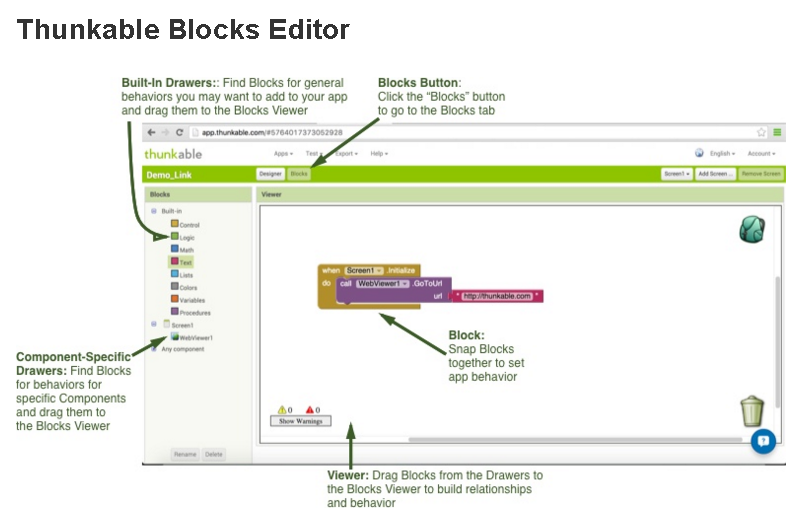
There are two parts to the tool:
1-Designer: Allows you to create an app UI by adding different UI components to your screen, such as buttons, TextBoxes, GoogleMaps, etc. It also allows you to add non-visible components to your apps, such as SMS receivers or NFC sensors.
2-Blocks: Thunkable has a blocks-based programming language that makes it easy for novice programmers to use, but is sophisticated enough for seasoned developers to use (you can make functions, variables, callbacks, etc.).